WPT GTO Trainer: Practice Final Table Play
All of the big prizes and money in a Tournament are at the Final Table. Whether it is your local daily or a WPT Main Event, understanding the unique strategy adjustments for Final Table play is vital to finishing strong.

Are you prepared to put pressure on a short stack and do you know how to respond when the pressure is on you?
Do you consider ICM (the estimated dollar worth of a stack size) and how to adjust when there are pay jumps?
We are excited to announce the brand-new WPT GTO Final Table Play scenarios to help better prepare you to make the most of your next Final Table!

Members can click "What you would like to train today?", select the Final Table Play filter, and choose from the list of available scenarios to start training.
Review the payout structure before you begin by clicking the Payouts link. These numbers represent the percentage of the prize pool for each place.

Click START NEW SESSION and begin! Practice these new simulated Final Table situations to gain valuable experience, be better prepared, and have the advantage the next time you are in position to win.

Play through 5 FREE solved random hands from the WPT GTO Trainer Final Table Scenarios by clicking below and see how close you are to GTO play...
Your goal is to select the action for each individual hand that is as close to 0.00 EV as possible.

Not a Member? Join Fearless River.com for just $5 your first month of Membership to play more GTO hands (and as often as you like) to find YOUR leaks and start seeing true stats for YOUR play!
Get real time feedback on trouble Spots and Ask the Fearless River Pros with one click.
The Fearless GTO Trainer: Get Started
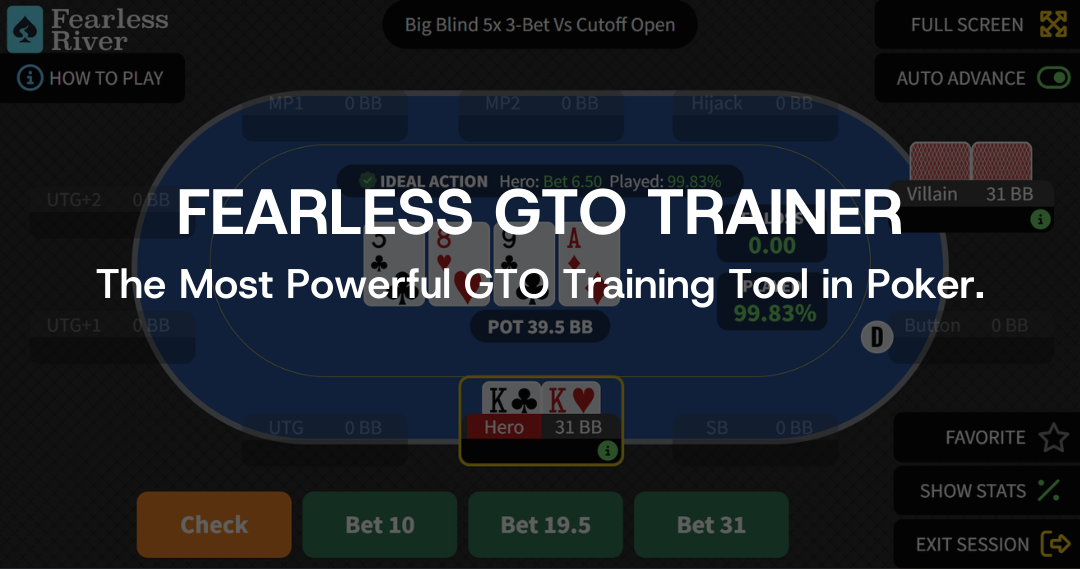
Play → Learn → Improve
With The Fearless GTO Trainer
There have been many poker “trainers” in the past that allowed you to play hands for practice. However, these have been powered by people’s opinions of what is good play and not true Game Theory Optimal (GTO) strategy.
What makes Fearless River’s GTO Trainer different?
- Our GTO Trainer allows you to play through true Nash equilibrium solutions to various No-Limit Hold'em poker scenarios (over 4 BILLION solved spots and counting).
- Get instant feedback on the precise EV (Expected Value) Loss of every move you make.
- Rapidly plug leaks and learn the GTO strategies that have dominated the highest stakes games in the world.
OK, time to get started...
Reference Guide Shortcuts
➧ Training on Mobile
➧ Getting Started
➧ Begin Your Training
➧ Hints and Tips
➧ Understanding Your Results
➧ Session Summary
➧ Review Previous Sessions
➧ Train with Team Fearless River
Training on a Mobile Device?
To play the Fearless GTO Trainer without the need for screen adjustment between hands, simply add FearlessRiver.com as a shortcut to your iOS and Android mobile device.
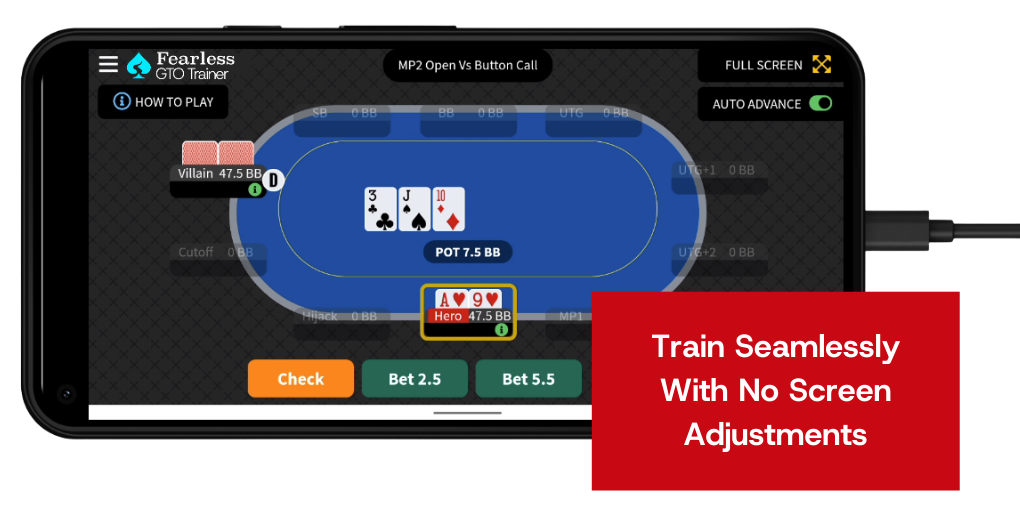
Click below for a few simple steps to train optimally using the GTO Trainer from a mobile device:
Getting There
Using the Fearless GTO Trainer is fast and easy! Members can click TRAINER in the top navigation bar or mobile menu.

Getting Started
Members must be logged in to your FearlessRiver.com Membership to start Training and Practicing.
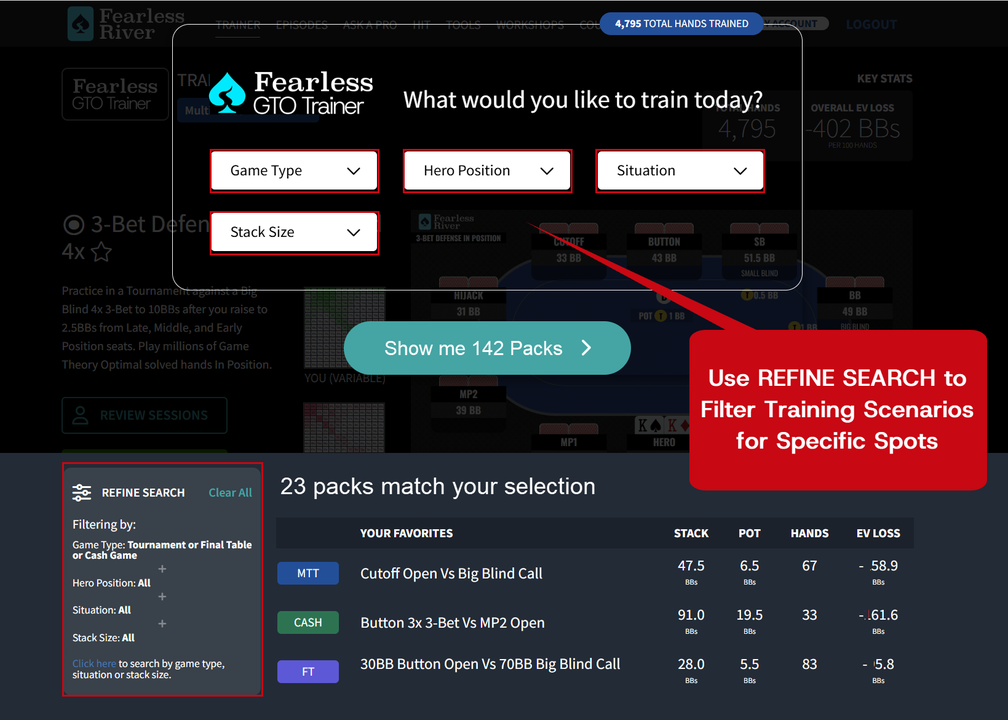
1) Select the specific spot you want to train from the available list of Scenarios (ex: Cutofff Open vs Big Blind Call)
- Use REFINE SEARCH to filter for specific training scenarios.
- Spots will be either a Cash Game or Tournament scenario. Packs are labeled as CASH, MTT - Tournament, FT - Final Table, SMALL - Small Stakes, or HU - Heads Up.
- Click the drop down box to select the specific Game Type, Situation, Stack Size, and the position you would like to train.
- Select multiple options in the menus to narrow your search.
Hint: Any scenarios with a green PLAY NOW button are packs available to your current membership that you have not trained with yet.
2) When selecting the spot to train, take note of the effective stack size in big blinds and pot size information to consider when making your decision (see image below for example). These factors will remain constant at the start of each new hand based on the specific Scenario you’ve selected.
Here are some additional tips for choosing which spot to train:
- Your position and action (Hero) is always listed first in the scenario name.
- Each scenario will have you training from either In Position or Out of Position (noted in the description of scenario action).
- Cash Game scenarios use a green table
- Tournament scenarios use a blue table
- Final Table scenarios use a purple table
- Small Stakes scenarios use an orange table
- Heads Up scenarios use a burgundy table
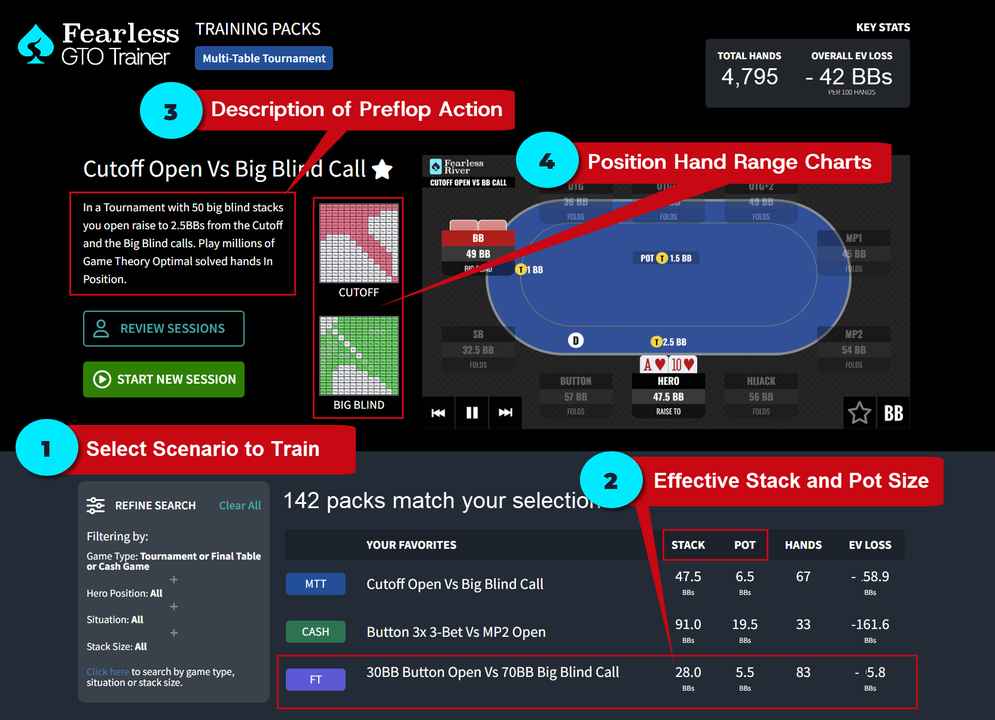
3) The description of scenario explains the preflop action.
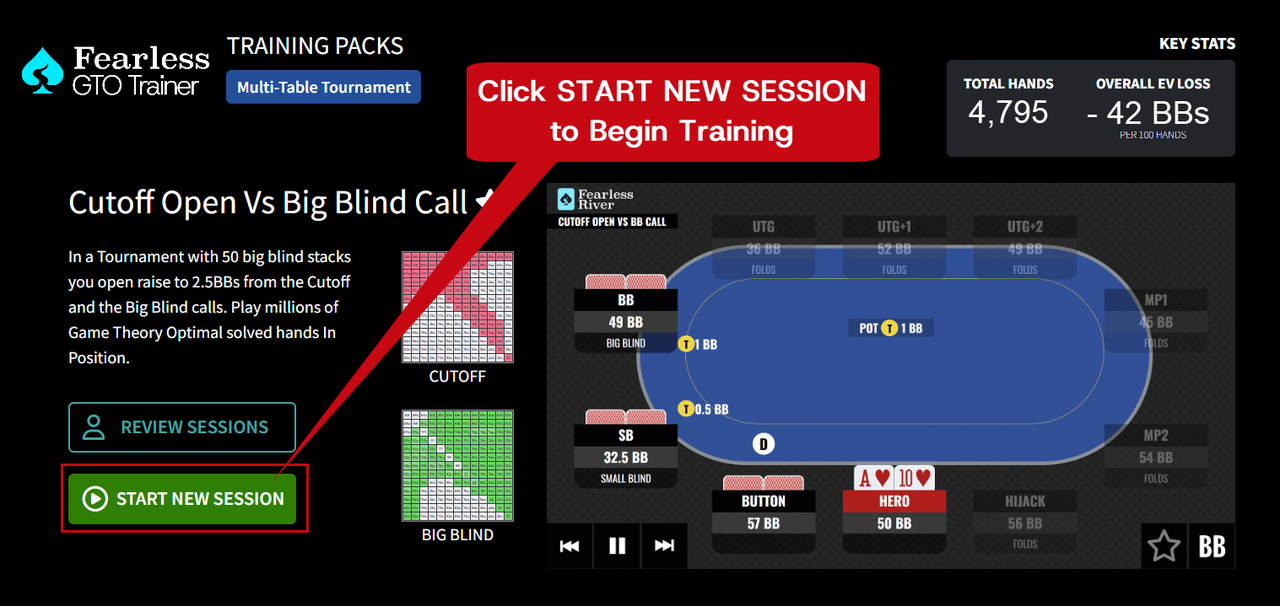
- Example: Cutoff Open Vs Big Blind Call Scenario:
- Hero (you) are the Cutoff player and open to 2.5BBs preflop
- The Big Blind (Villain) calls and everyone else folds
- Action starts with the flop and 6.5BBs in the pot
4) View the Hand Range Charts per Position for this Scenario.
- The hand range charts for Hero and Villain show respective ranges going to the flop (after their last preflop action).
- Percentages listed for specific hand combos indicate the frequency with which those specific hands are in the overall range for the given scenario
- Hand ranges are also color coded based on order of action preflop. (lighter or darker shades of each color visually indicate the frequency for these hands):
- The LAST preflop aggressor's hand range is shown in red
- The preflop caller's hand range is shown in green
Hint: Select the image of the hand range charts per position (ie Cutoff or Big Blind) to expand to a larger view
Begin Your Training
After selecting the Scenario you wish to train, simply click or tap on the START NEW SESSION button to start!
Reminder: When training you should be solely focused minimizing EV Loss, instead of whether or not you win any one particular hand.
This allows you to have a long term mindset towards poker that focuses on the quality of decisions and not short term results.
Make Your Best Decisions
Click START NEW SESSION and you will instantly be faced with a postflop decision based on the Scenario you select from the menu.
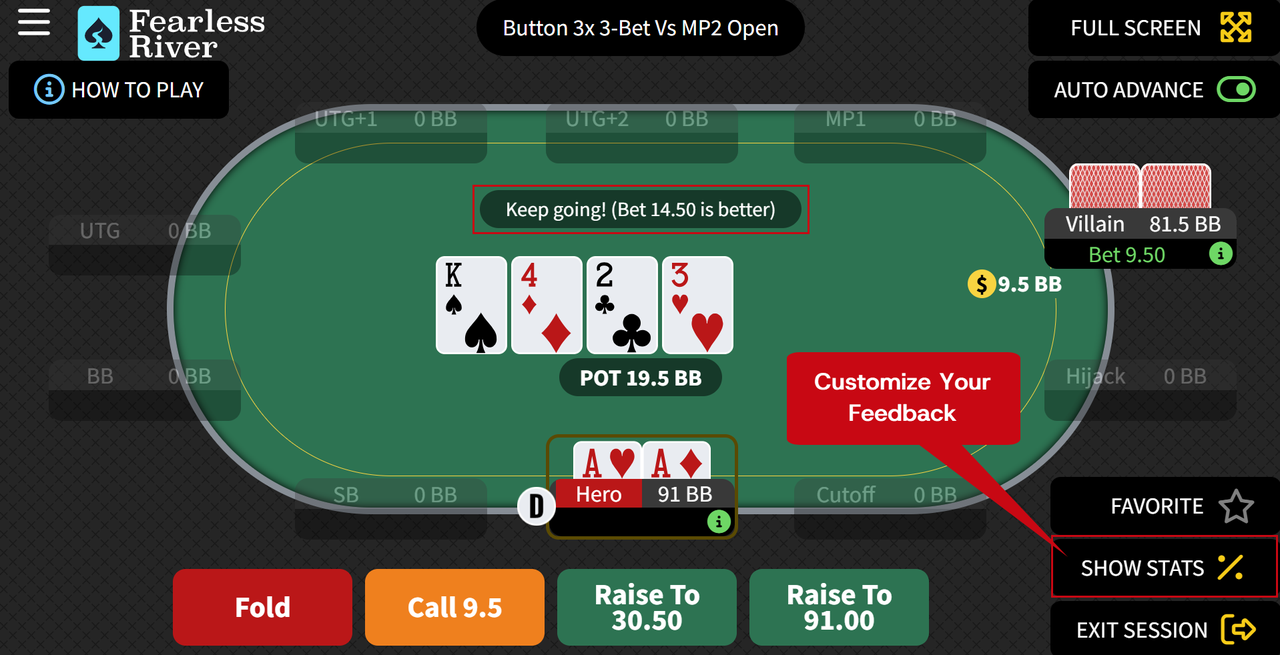
1) Customize the GTO Trainer to change how you get instant feedback while training!
- Click the SHOW STATS % button and choose between:
- Specific EV Loss and % Played Percentage Stats for each action (green)
- Simplified response that indicates if the action you chose is correct or not recommended (orange)
- The simplified feature is perfect for players who are just starting to study Game Theory Optimal Strategy
2) You'll immediately be faced with your first decision.
- Choose Fold, Call, Check, Bet, or Raise by clicking the button
- Bet sizing options are those commonly recommended by GTO
- Villain’s responses to your decisions are GTO - you’ll often face multiple decisions in a hand
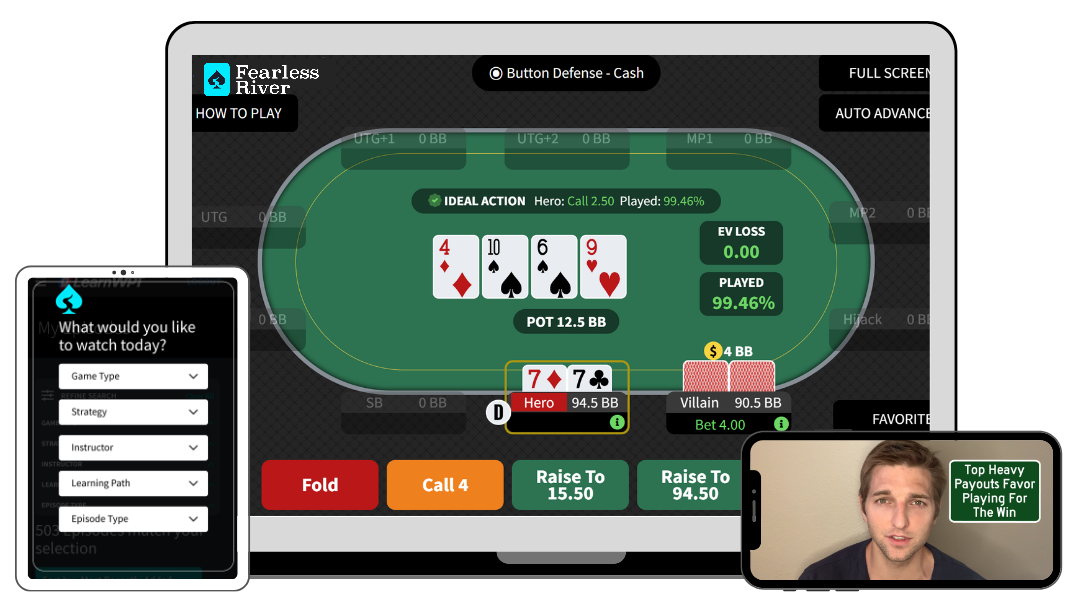
3) After each decision, you'll see the EV Loss and Played % for your action directly on the table.
- EV (Expected Value) Loss: This shows the number of big blinds you would lose against a GTO player if you took this action
- Played %: This shows how often a GTO Player would take the same action you took
Remember - EV Loss of 0.00 does not mean the GTO Player would take that action 100% of the time (the difference is due to balancing ranges through mixed strategies and maximizing EV for your overall range).
4) Your goal is to select the action for each individual hand that is as close to 0.00 EV as possible.
- EV Loss of 0.00 is the same action a GTO Player would take.
- 0.00 EV Loss means you broke even against a GTO Player.
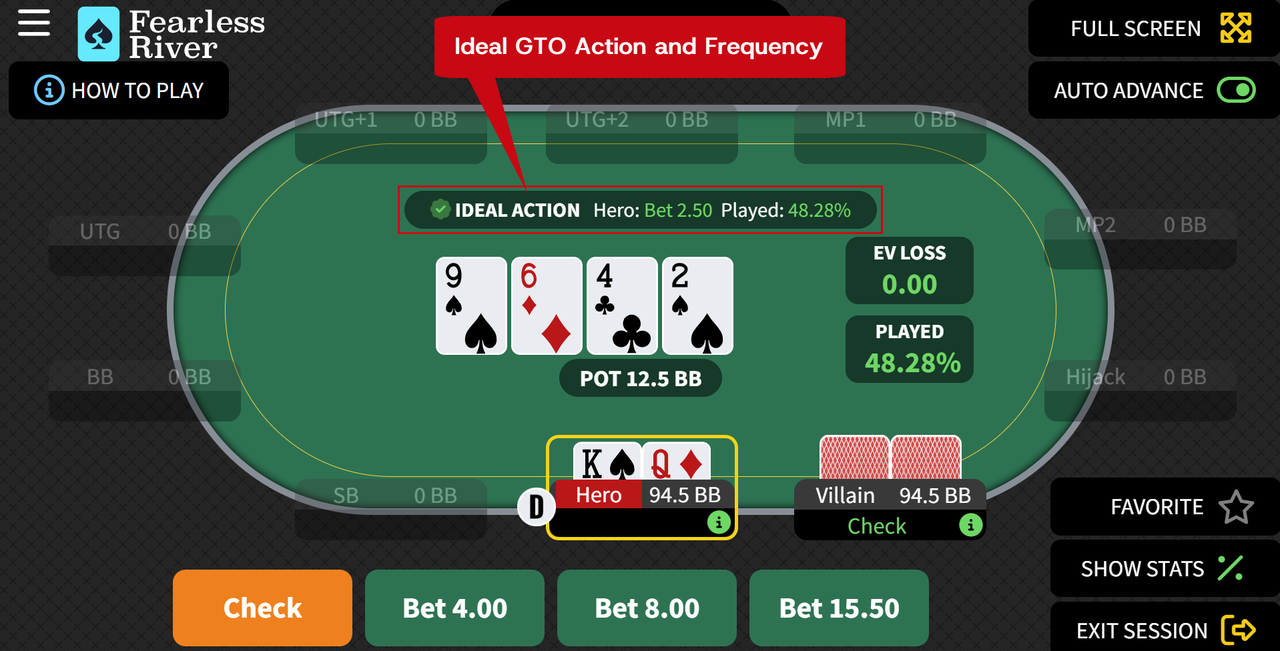
5) The Ideal GTO Action is noted in the top center of the table.
- A green check-mark next to your action means it is GTO.
- Next is the action a GTO Player would take and how often they would take that specific action.
Ideal Action and Frequency are displayed so you know the GTO play for each action immediately.
6) Multiple actions in a given spot are often "correct" according to GTO Play.
- GTO Play has many mixed strategies, where plays are made a specific percentage of the time.
- You will often see actions with a very low EV Loss (e.g. -0.01) and a reasonable Played % (e.g. 35%).
- These actions are not "wrong" and are part of a balanced overall GTO strategy
- If a play results in high EV Loss (color coded in red), you should generally avoid that play unless you have compelling exploitative reasons to make it against a specific opponent
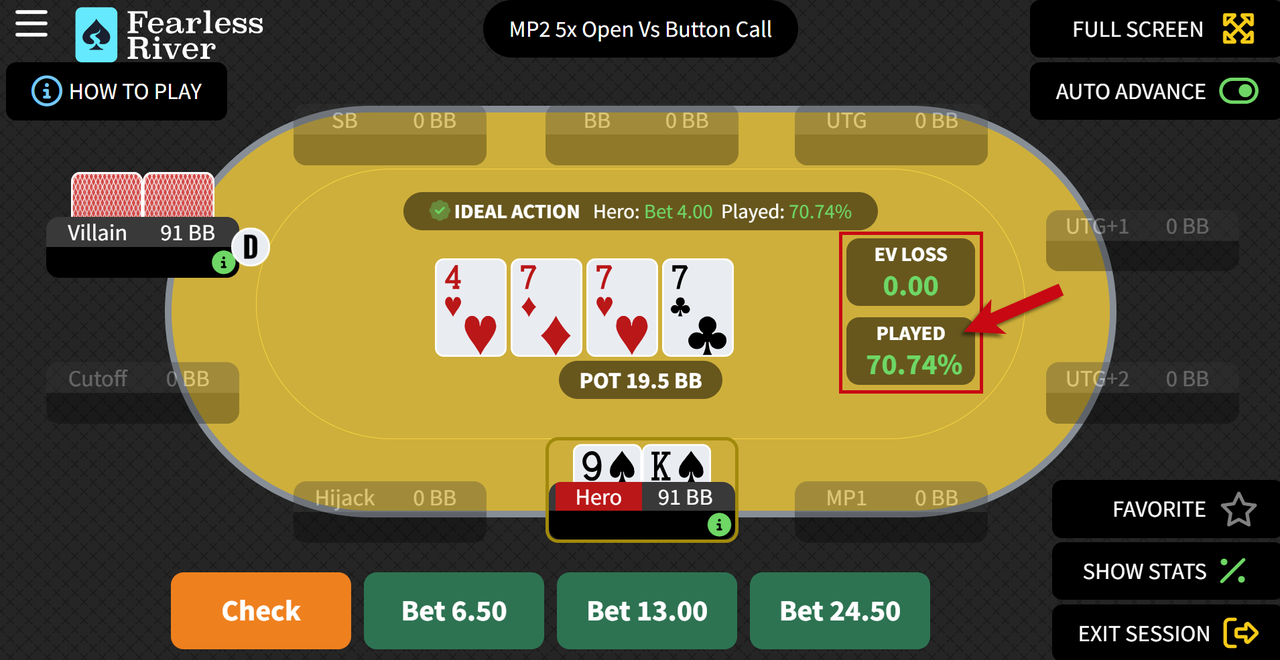
- If the Percentage Played for an action is 1% or less, then that action is rarely taken by a GTO Player and you should generally avoid that play.
- If you select an action that results in a Played % of 1% or less, all subsequent decisions for that specific hand will display "N/A" in red, since that entire line should be avoided
EV Loss Color Coding Hint: Green = Near GTO Play, Orange = Take Caution, Red = Probable Leak in Your Game
Trainer Hints and Tips
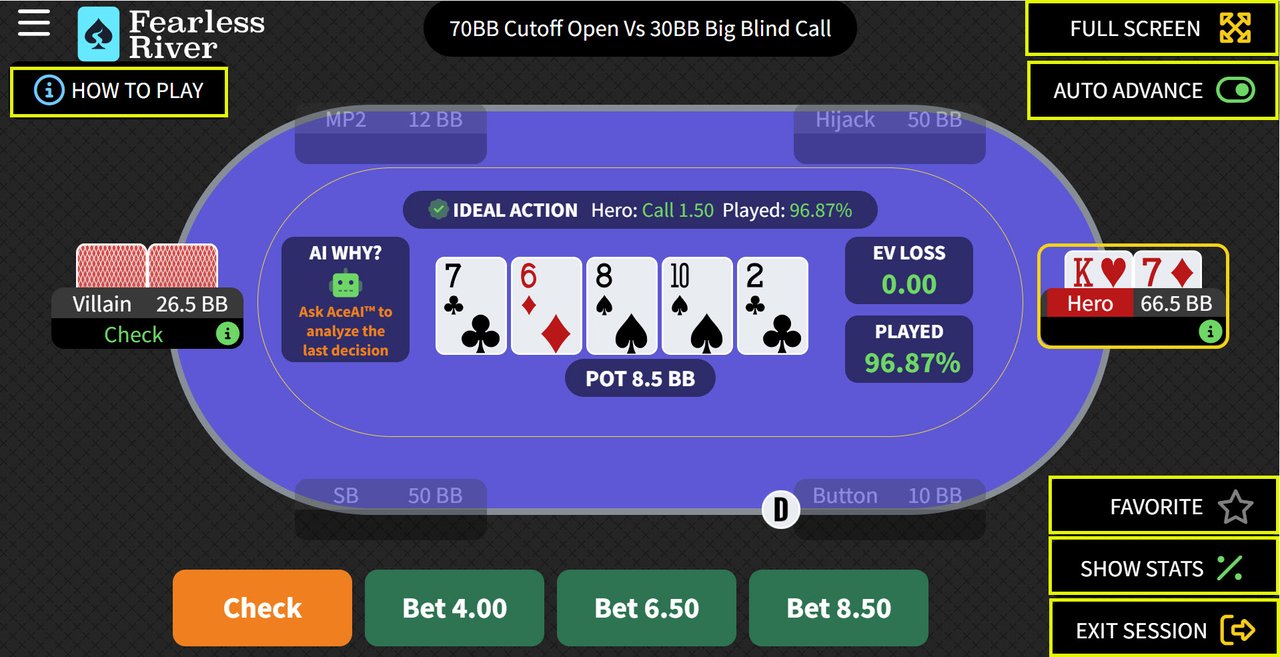
- Toggle the AUTO ADVANCE button to advance to the next hand decision automatically (green - default) or manually (red).
- For new users we recommend leaving the Auto Advance button in the off position so that you can take your time and review the real time feedback
- Click the FULL SCREEN button for a large view.
- Review these instructions anytime by clicking HOW TO PLAY.
- Toggle the SHOW STATS% button switch between specific EV Loss and % Played Percentage Stats for each action (green) to a simplified response that indicates if the action you chose is correct or not recommended (orange).
- Select FAVORITE to save a hand to your library for future review or to send to Ask a Pro.
- Click the EXIT SESSION button to complete your Training Session and review your stats on the Session Summary Page.
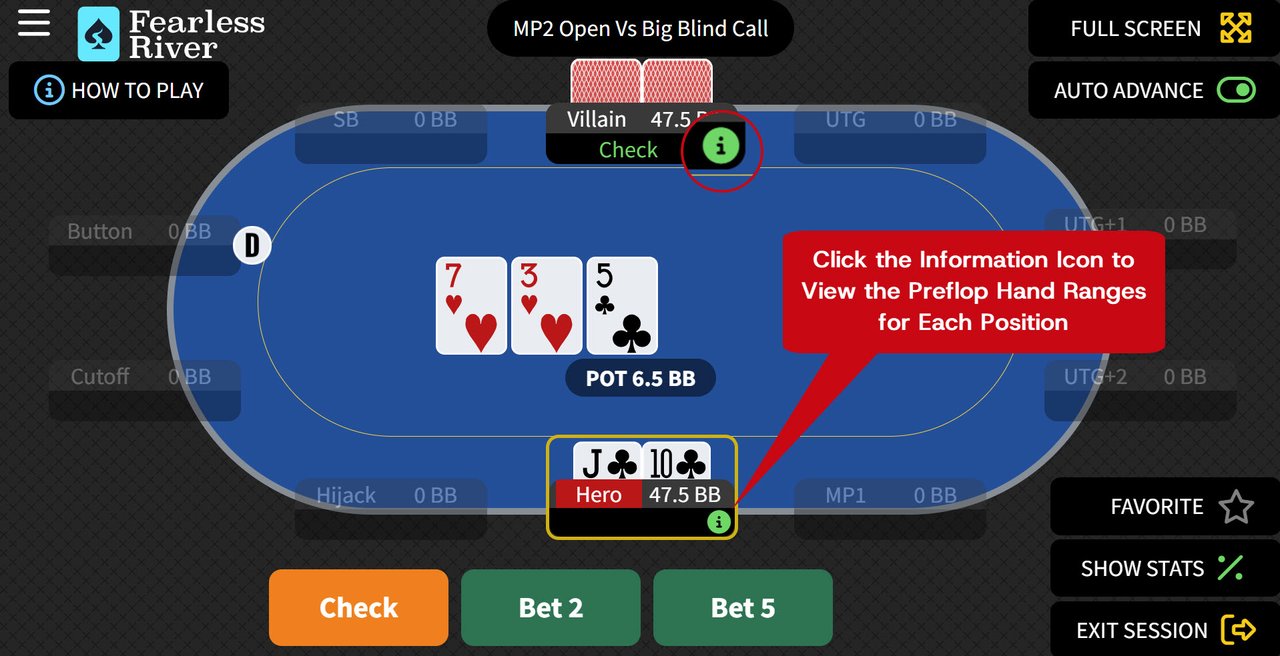
- View the hand ranges during a session by clicking the green ℹ️ information icon button to review the charts during play
- The hand range charts are labeled by position name
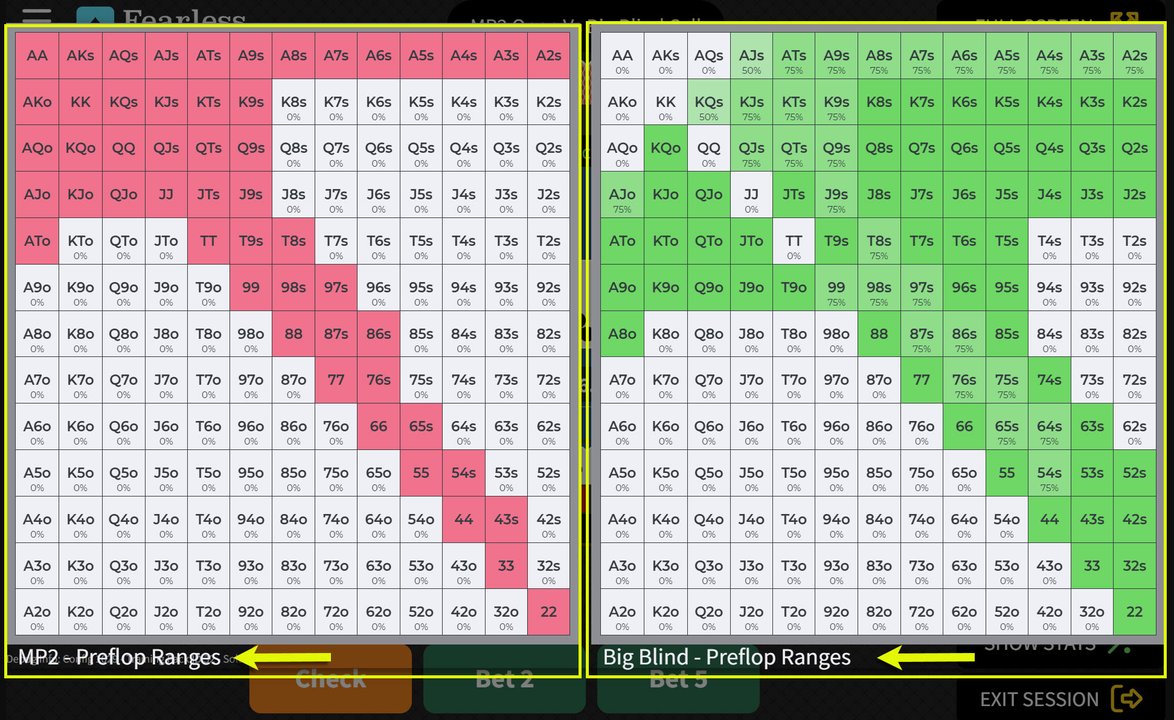
View the charts when facing a difficult spot and examine the possible hand combinations to help train your decisions closer to 0.0 EV Loss.
Understanding Your Results
Your overall EV Loss and Total Hands played are accessible right from the Fearless GTO Trainer Dashboard.
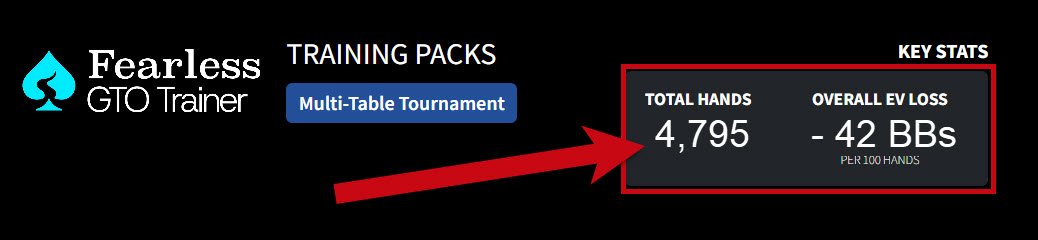
Remember, the Fearless GTO Trainer puts you up against an unbeatable (i.e. perfect) opponent. There is no winning in the long-term against it. The most we can ever hope for is to break-even. This is great for us, since this perfect opponent is also the perfect teacher.
Over time, the closer you come to break-even play against the Trainer, the tougher player you’ll become and the harder it will be for your opponents to outplay you.
And if you have high EV loss don’t get discouraged. It’s normal to feel challenged when you are learning new concepts. After all, the GTO Trainer is literally a perfect opponent.
WHY FOCUS ON EV LOSS?
The way we measure our performance against the GTO Trainer is by tracking "EV Loss" or Expected Value Loss.
The best possible result after you pick an action is an EV Loss of 0. This means the action you chose breaks even against a perfect player.
- When EV Loss isn’t 0, the number shown is the amount of big blinds that we would lose taking a specific action in the long run.
- It's possible to make a poor play (high EV Loss) that results in winning a specific hand.
You’ve all seen players make bad plays and win the pot or make the right play and lose the pot. Over time EV Loss will track closer and closer to actual losses.
Session Summary Information
You’ve put in the work, now you can start to see where your specific leaks are for each Scenario. Your Session Summary will break down your hand compared to GTO Play.

Reading and Interpreting the Data:
KEY STATS:
1) Overall EV Loss in big blinds Per 100 hands played.
- Goal is to get as close to 0.00 as you can.
- 0.00 EV Loss is impossible for humans to attain in the long run.
- Do your best and focus on spots giving you the most trouble.
- Do not be discouraged by a high EV Loss in the beginning. When new to GTO Trainer, it's very common for players to have an EV Loss of -50.00BBs/100 or more
2) Number of Hands Played in your Session
- Sample size is important when considering relevant statistics.
- A minimum of 200 hands is the recommended sample size to start seeing stats for your play.
- Schedule a set number of hands each day to practice a specific Scenario and keep track of your progress.
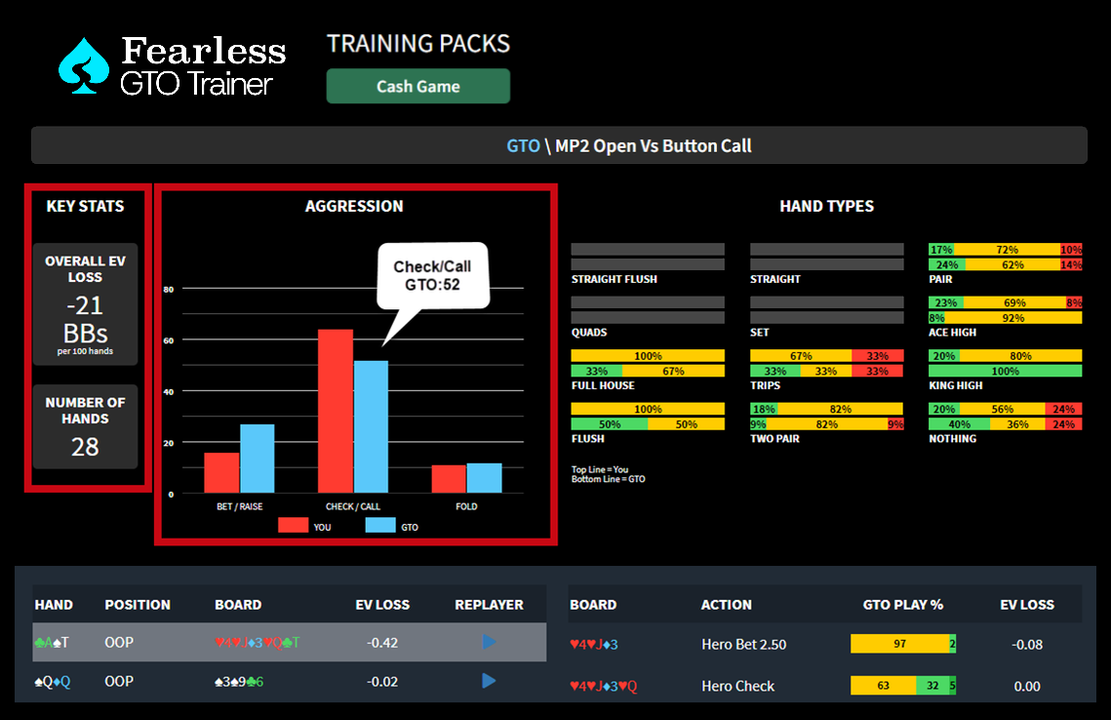
AGGRESSION:
3) AGGRESSION gives an instant snapshot of the key actions You (shown in red) are taking across all hands played vs what actions a GTO Player (shown in blue) would take
- Don't Worry, if you initially have a huge gap in one direction vs GTO - this is not uncommon.
Hint: Hover over the bar graph to see the number of hands in that session each action was taken by you vs a GTO Player.
HAND TYPES:
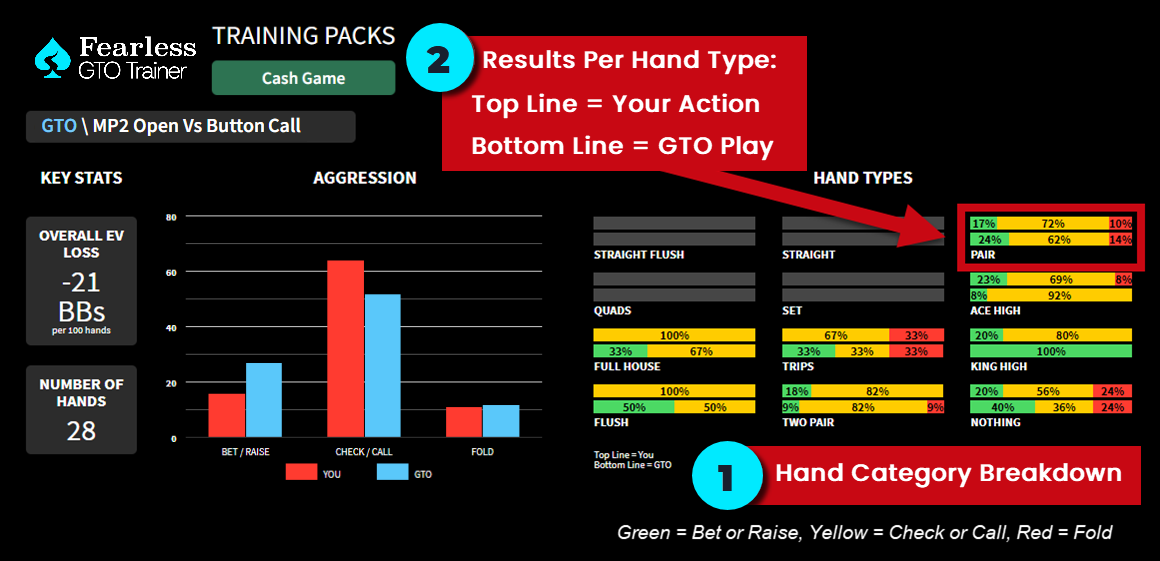
1) HAND TYPES compare your play to GTO Play divided by the different categories of hands (i.e. pairs, flushes, trips, etc).
- Your Action is on the top bar and GTO Play is the bottom bar.
Hint: Green (aggressive action) = Bet or Raise, Yellow (passive action) = Check or Call, Red = Fold. A color key to be implemented shortly!
2) How to read your results - in this example from the dashboard image for the PAIR hand category shown above:
- You chose to either Bet/Raise 17% of the time, Check or Call 72% of the time, and Fold 10% of the time when you had a 1-Pair hand in this given scenario (top line of the bar graph)
- GTO Strategy is to Bet/Raise 24% of the time, Check/Call 62% of the time, and Fold 14% of the time (bottom line of the bar graph)
3) If the top line results are very different from bottom line results (after a large number of hands played) then you know you are playing those hand types differently than how a GTO Player would play them. These are the spots you want to study first.
Don’t get intimidated by stats listed or if there are big differences between your play and GTO Play. Keep training the same scenario and focus on your biggest leak before you play each Session. Before you know it you’ll be closer to 0.00 EV Loss (and GTO Play!).
HAND BREAKDOWN:
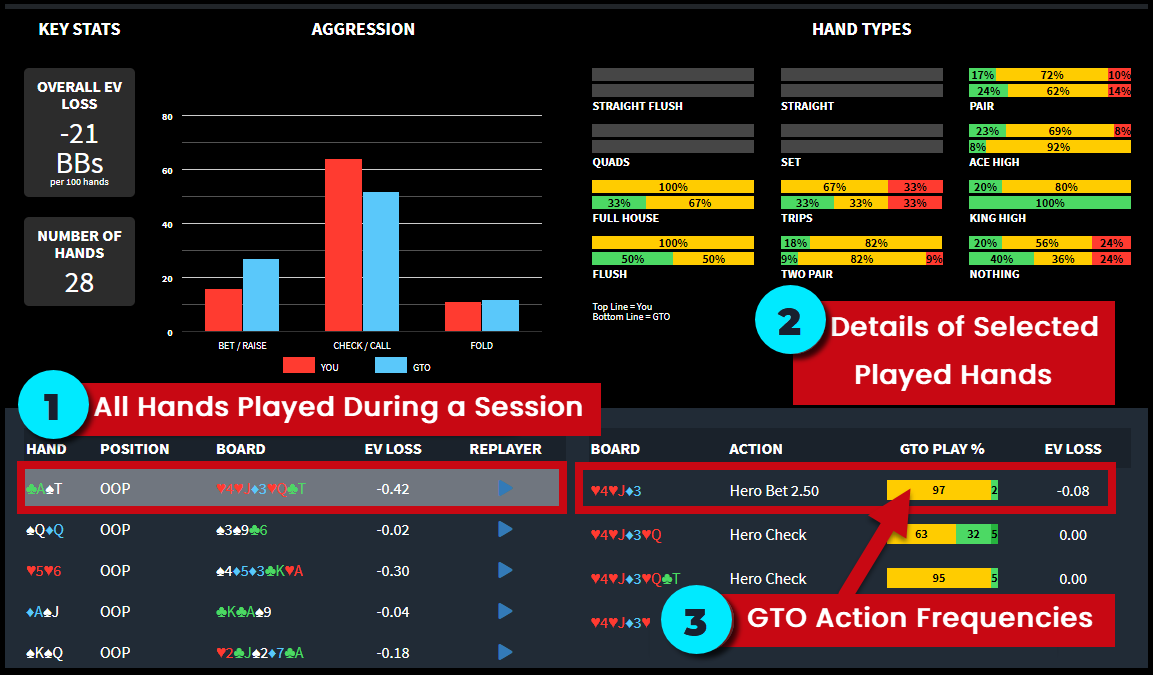
1) HAND BREAKDOWN displays all of the hands you've played in a session listed by hand type, position, board summary, and EV Loss.
- Click the REPLAYER button next to a specific hand played to show the action unfold and review for study later.
- Have questions about that hand? After replaying the hand click the ASK A PRO button to send your hand to the Fearless River Pros for analysis using the Ask a Pro Feature.

2) Select a specific hand played to see these details:
- BOARD: Shows the specific rank and suit for each street dealt - flop, turn, river.
- ACTION: The action Hero (you) chose on that street - bet/raise, call/check, fold.
- GTO PLAY %: Percentage of time a GTO Player would take a specific action if faced with the same decision.
- EV LOSS: Number of BBs your action loses against a GTO player.
- Evaluate EV Loss in proportion to pot size
- An EV Loss of -1.00 is significant in a 6.5BB pot. It is far less significant in a 100BB pot
- The color coding of EV Loss on the Trainer table takes into account pot size
3) Each street of action is broken down with a color coded bar graph noting the specific actions a GTO player would take if faced with the same decision as HERO, including the percentage of time a GTO player would take those specific actions.

- In the above example our decision to bet 2.50 on the flop you will see that a GTO Player:
- Checks 56% of the time
- Bets small 15% of the time
- Bets large 28% of the time
- Green = Bet or Raise, Yellow = Check or Call, Red = Fold
4) In some instances you will see gradient shading (lightest to darkest moving left to right) representing the bet-sizing that a GTO Player would choose in a given spot.

- In the example above:
- Bet/Raise small amount (lightest green)
- Bet/Raise larger amount (darker green)
- Bet/Raise largest amount (darkest green)
Review Previous Sessions
Review previous Sessions from the main GTO Trainer Dashboard!
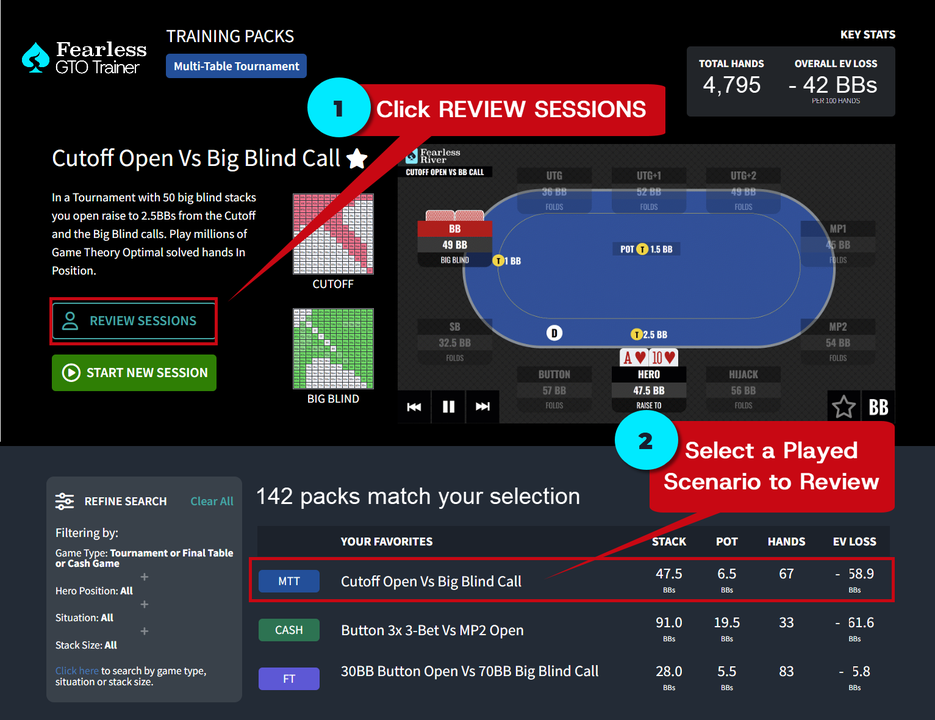
1) Select the spot you would like to review from available scenarios.
- The total number of hands played as well as your total EV Loss overall for the specific Scenario are listed for quick reference.
2) Click the REVIEW SESSIONS button.
3) Select a Session you played from the list.
- Overall EV Loss, Session Date, and Total Hands played are listed for each Session within each specific Scenario.
- For best results and rapid improvement start by studying your largest EV Loss Spots.

4) Click the Blue REVIEW SESSIONS button to get the specific statistics for the individual session within a scenario. A session review window will open.
Ask the Fearless River Pros
Need help interpreting the results and have strategy questions? Use the Ask a Pro Discord to share specific hands that gave you trouble while training directly to Team Fearless River for answers.
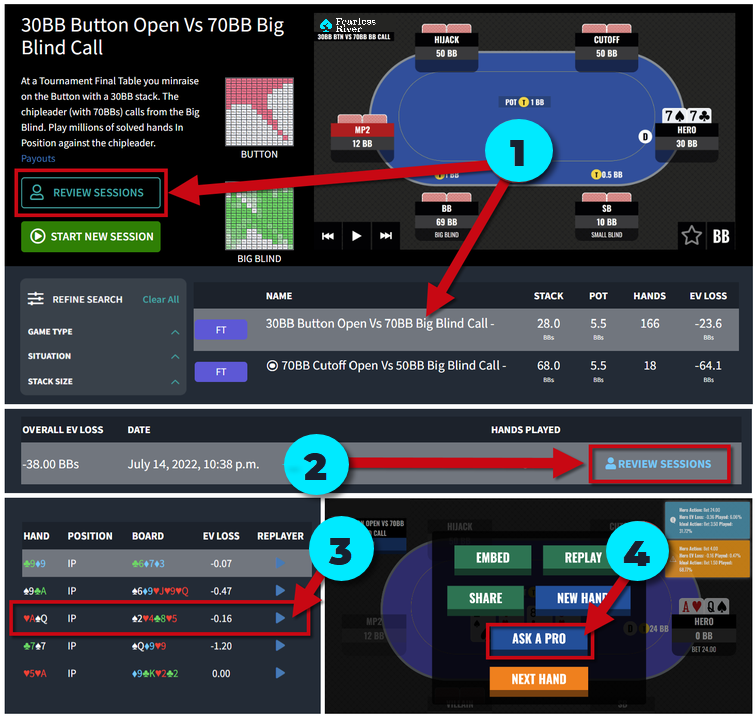
- Select the Trainer Pack and click the REVIEW SESSIONS button
- Find the date of the specific session and click the blue REVIEW SESSIONS link
- Find the specific hand that you had a question about and click the ▶ REPLAY icon
- After the hand action replays click the ASK A PRO button
Enter your subject line, question, and SUBMIT. Your question and a replay of the hand will go directly to the Ask a Pro Forum to be answered from Team Fearless RiverT!
Train With Team Fearless River
With Train & Explain Episodes we've combined two key factors to improving your game: drilling hands and having a feedback loop. Train & Explain will help make learning GTO Strategy fast and easy regardless of your skill level!

Train & Explain Strategy Episodes gives you an exclusive seat behind a Fearless River Pro for select hands from the GTO Trainer to learn the "why" behind each decision.
There is a twist: you'll play the same hands as the Fearless River Pro for each Episode. After playing, watch the Strategy Episode for a detailed breakdown of each decision point as Fearless River Instructors analyze the same hands you just played.
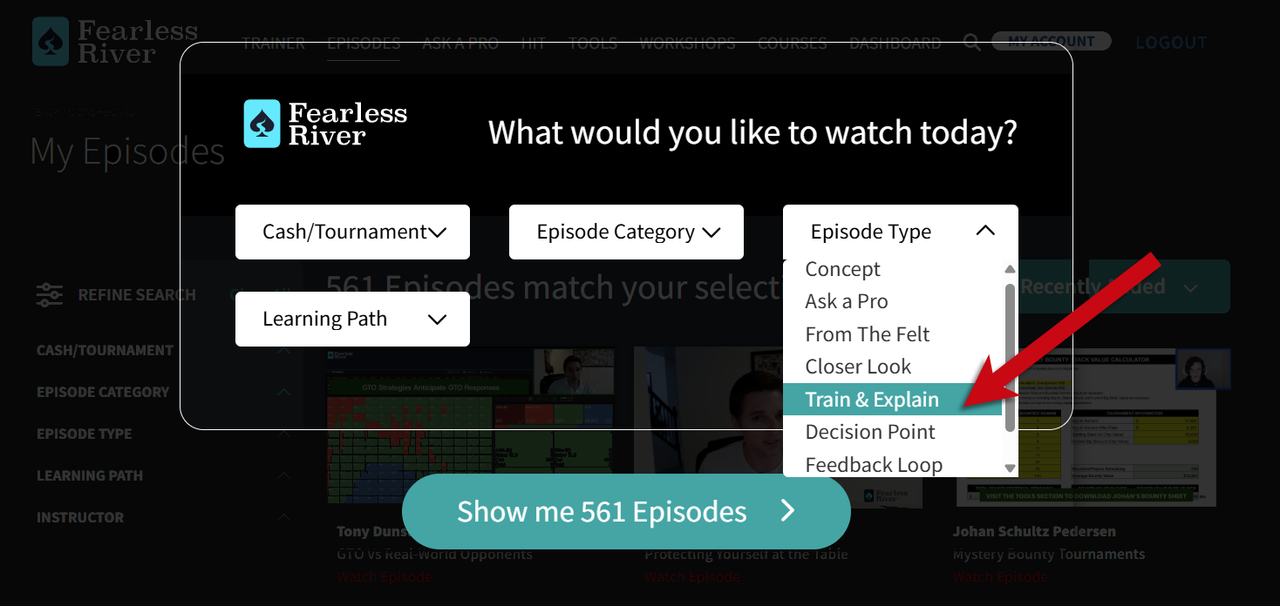
Tip: Use the REFINE SEARCH to filter for all Train & Explain Episodes.
We know you’ll have a lot of questions about GTO Strategy and we’re here to help! The Fearless Instructors will be showing you plenty of specific ways to use the GTO Trainer to improve your poker game in future Strategy Episodes.
It's Time To Play
Now that you’ve had a chance to walk through how to navigate the Fearless GTO Trainer it’s time to play!
Whether you need practice postflop after defending your big blind in a tournament, or you want to drill 3-bet defense from middle position with deep stacks in a cash game, it’s just one click away.
Train as often as you like. Get real time feedback on trouble spots and ask the Fearless River Pros with one click.
Play Real GTO Hands Online
As Part of Your FearlesseRiver.com Membership
We Want Your Feedback! Email the Support Team at [email protected] with any questions or suggestions.
Are You Using the Fearless River Hand Input Tool (HIT)?
If yes, THANK YOU and congratulations on taking another step in improving your game! If not, let's change that today.
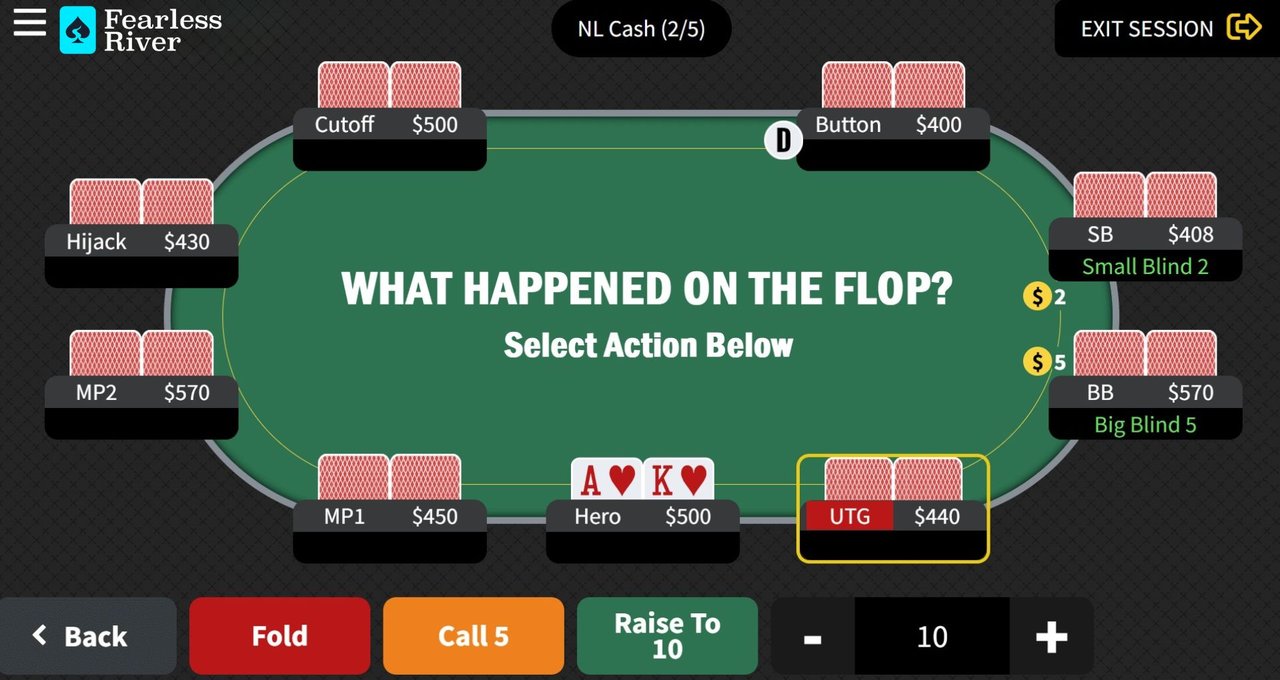
So, what exactly is HIT?
The Hand Input Tool (HIT) is a Fearless River feature that allows members to capture, replay, and share real hands they've played and receive analysis and feedback from the Fearless River pros.
See below for info, hints, and the benefits of this powerful feature:
Getting Started:

Log in and access HIT from the top navigation bar or via the mobile menu. For more instructions, watch the "Show Me How It Works" video on the HIT Dashboard or review Episode 226: Hand Input Tool (HIT).
Recording your hand:
➧ To begin, click the red ENTER A HAND NOW button.
➧ Enter the game specifics:
- Select Cash or Tournament
- Enter the Blinds Amount
- Select the type of Ante and enter the amount
- Enter the number of Players Seated
- Click the NEXT button to record the action
➧ Follow the onscreen prompts to record the hand information.
➧ Shortcuts when entering hole card information for quicker recording.
- Type the first letter or number of the card value and suit versus clicking each option to select your card. Example:
- Type "a" + "c" to select A♣ or type "2" + "d" to select 2♦
- Use the +/- keys to increase/decrease values or click your cursor into the field box and manually type the value.
Helpful Hint: Click the EXIT SESSION button in the top right-hand corner of the screen to stop the hand at a specific point for analysis before getting to showdown.
Receiving Feedback:
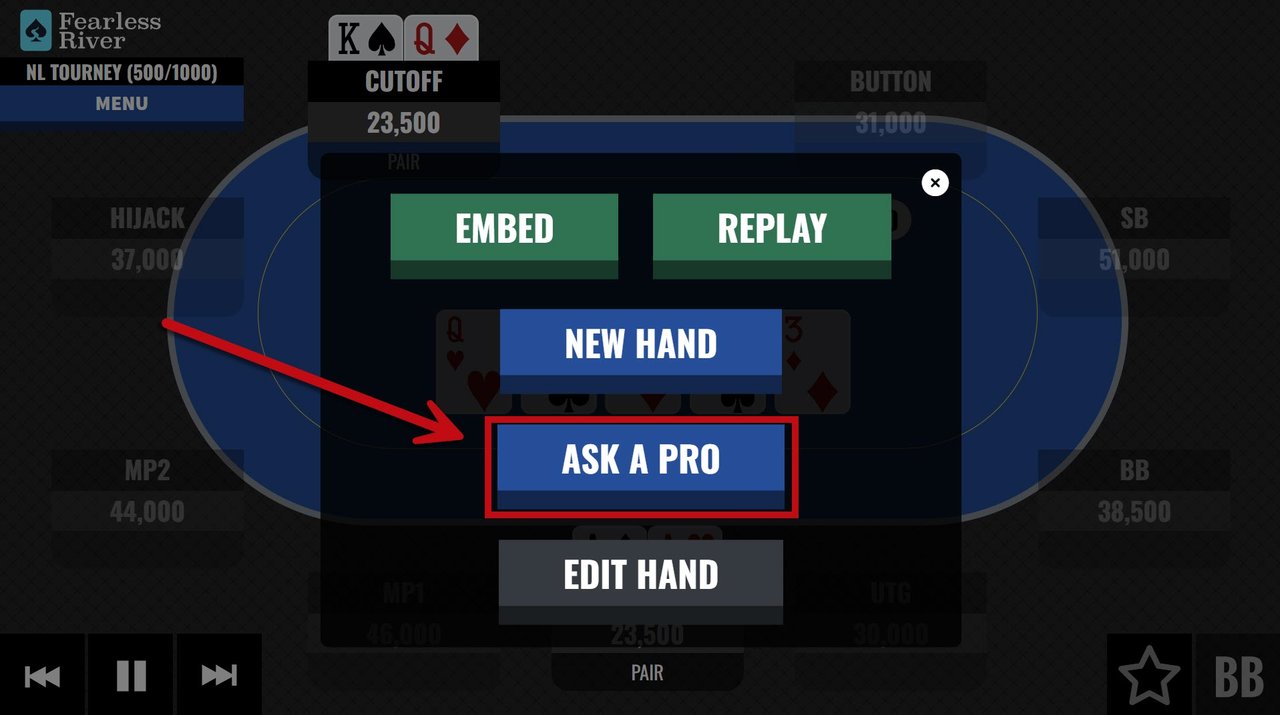
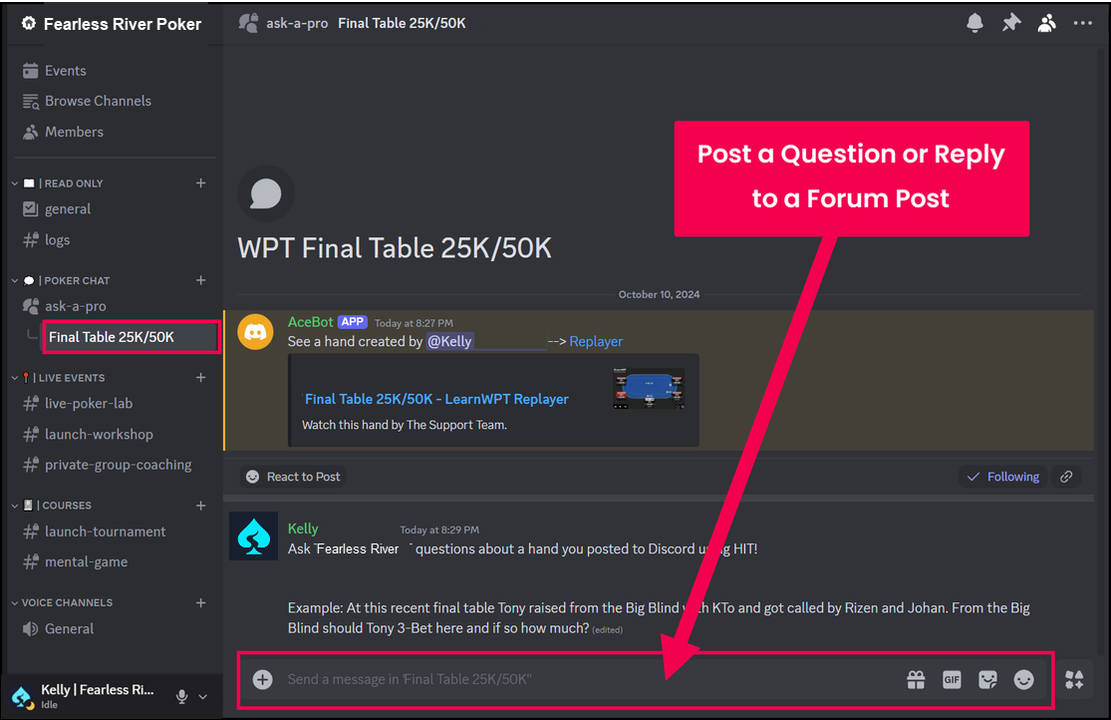
Members can submit their recorded HIT hands to the Fearless River pros for analysis of their play and get answers to questions about a specific move or strategy using the Ask a Pro Discord channel.
Sending your hand in for feedback:
➧ Once finished recording your hand, the action will replay, and a pop-up will appear noting options for your hand.
➧ After replaying the hand, click the ASK A PRO button.
➧ You’ll automatically be directed to the #ask-a-pro Discord channel, and your HIT hand will be immediately posted.
➧ Type your question to Team Fearless River about the hand.
That's it! The Fearless River Pros will provide feedback shortly.
Don't have a Discord account? Click here to get started.
HIT Helpful Hints:
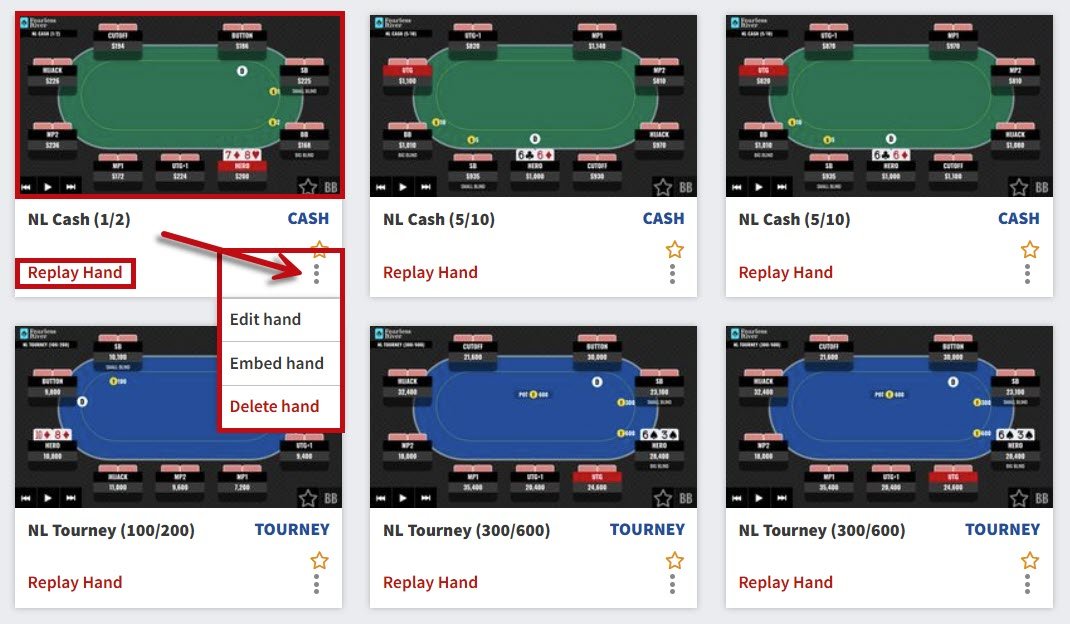
Our goal is to make HIT an easy-to-use and personal experience. Be sure to share with us any suggestions.
Did you know you can:
➧ Update the name of a hand by clicking the NL Cash or NL Tourney fields in the top center of the screen.
➧ Change the name/nickname of a player and their chip stack by clicking their position tile - PLAYER NAME and CHIP STACK fields.
➧ Replay, delete, or edit hands you've saved from your HAND LIBRARY by clicking the thumbnail image or vertical ellipsis.
➧ Shortcuts when reviewing the replay of a hand for quick navigation.
- Pause/Restart Action = Space Bar
- Show Hole Cards = "H" Key
- Move Action Forward/Backward = Right/Left Arrow Keys
- Toggle Stacks Between Big Blinds/Chips = "B" Key
- Toggle Between Player and Position Names = "A" Key
The habit of recording hands you've played, followed by analysis (and feedback), creates a positive feedback loop for improvement, which allows you to find (and fix) leaks faster while learning to make better decisions at the table.
We are excited to provide this invaluable tool for our members to help create that loop and to provide them with helpful feedback.
Thanks for being a part of Fearless River!
Not a Fearless River Member But Want
to Use the Hand Input Tool?
Join today for just $5 for your first month of membership!
In addition to the Hand Input Tool, you’ll also have access to these game-changing Member Features:
- On-demand library of 550+ in-depth Strategy Episodes
- Practice and drill hands using the GTO Trainer and get instant feedback on your play
- All of your poker questions answered with the Ask a Pro feature
- Downloadable Tools you can use at and away from the tables
- and more!
If you have any questions regarding Fearless River, contact our support team at [email protected] and we’ll be happy to help.
Introducing the Fearless River Poker Training Community Forums!
We are excited to announce the newest Member Feature
Fearless River Community Forums!
Watch the above video from Fearless River Lead Instructor Nick Binger as he introduces this exciting new Fearless River Member Feature.
To access the Fearless River Community Forums click the below link or COMMUNITY from the top black navigation bar or mobile menu!
Please note: You must be signed in to your Fearless River Membership to view and post on the Community Forums.

We know that one of the most challenging aspects of improving your poker game is the feeling of being alone on your journey and not having a team (or better yet a community) to support your poker goals.
That’s why we created the Fearless River Community!
Now you can join fellow Fearless River Members in discussion about all things poker by using the community forums to talk Cash and Tournament concepts, or just about anything poker related in the General Discussion forum.
P.S. The Fearless River Pros will pop in regularly to join in a discussion!
Some Pointers and Guidelines:
- Create or respond to a post: Select the appropriate Forum (currently cash, tournament, or general discussion – more to come!) and click the NEW TOPIC button.
- Community username: To change your Community username (which is the same as your Ask a Pro username) visit the My Account Page. Click the change username & hometown link under Basic Info and save.
- Upload an avatar image: To create a profile avatar click either your name in a post or by the VIEW MY POSTS link to visit your Community Profile. Click the EDIT PROFILE button and upload an image!
- Interested in comments for a specific post? Click the green SUBSCRIBE button when viewing the post. Click Subscriptions on the main page to quickly find and view those saved topics.
- Want to discuss a HIT hand you’ve played? After clicking the NEW TOPIC button, enter the subject line and message. Next select HIT in the message controls (see image below), select the hand you wish to discuss from your HIT LIBRARY, and SUBMIT.

- Join in the discussion: Click the blue POST REPLY button to add your comments and questions to a topic.
- Code of Conduct: The Fearless River Community is a place where all people are welcome and can participate, regardless of expertise or identity. This Community is rooted in kindness, collaboration, and mutual respect.
- Can we still use Ask a Pro? Don’t worry… we know that you still want direct answers from the experts. You can still ask your most pressing poker questions and get answers directly from the Fearless River Instructors using video or written Ask a Pro!
We Want Your Feedback!
We’re excited to hear your feedback or if you encounter any bugs so please make sure you share it with us by contacting the Support Team at [email protected] or by clicking the red NEED HELP? button to let us know how we can improve the Forums.
Use the Fearless River Community to expand your poker feedback loop and develop a continuous process for improvement through discussion with your peers.
Thank you for being part of Fearless River!
We’ll see you online,
Fearless River
Not a Fearless River Member But Want
to Join the Discussion?

Think Like a Pro!
Join for just $5 your first month of Membership!
In addition to the Community Forums you’ll also have access to these game-changing Member Features:
- The WPT GTO Trainer to play online and get instant feedback on your leaks
- On-demand access to in-depth Strategy Episodes
- All of your poker questions answered with the Ask a Pro feature
- Expert analysis from Fearless River Pros using The Hand Input Tool
- Downloadable Tools you can use at and away from the tables
If you have any questions regarding Fearless River, please contact our support team at [email protected] and we’ll be happy to help.
You are Short Stacked in a Tournament, what do you do?

The first thing is DON'T PANIC!
The second thing is check which Hand Ranges you should be shoving all-in with when you are first-in to the pot given your stack size and position.
How? By quickly reviewing the BRAND-NEW interactive Push/Fold Charts created by Fearless River and short stack specialist, Chris Wallace.

- Visit the Tools Dashboard
- Click the View Charts button to open the interactive Push/Fold Charts
- Select Big Blinds in your stack
- Select "With Antes" or "Without Antes"
- Find the number of players behind
- That's it! These ranges will be the most profitable to move all-in with
Helpful hint: bookmark the Push/Folds Charts page for quicker access
Learning how to utilize the short and awkward stack will improve your ability to get chips without good cards, even in the toughest games.
Watch more about the the fundamentals of Chris Wallace's world-class short stack strategy by reviewing Strategy Episode 168: Short Stack Play - Overview.
If you have questions about the Push/Fold Charts send your questions in using the Ask a Pro feature or contact [email protected].
P.S. You must be logged in to your Monthly or Yearly Fearless River.com Membership to view the Push/Fold charts!
Meet Fearless River Pro Chris Wallace!

Chris, known to the poker world simply as “Fox”, is a professional poker player, poker coach, and widely respected theorist and author on the game. Chris would contend that he's known more as a coach than as a player, having served as coach and mentor to several successful players. Read Chris's Full Bio →
What is a Strategy Episode?

We started Fearless River with the goal to make it as easy as possible for anyone to improve their poker game in their spare time. We did that because the key factor that separates most poker players from winning pros or students of the game often comes down to small, consistent amounts of effort.
We use Strategy Episodes to teach key poker concepts, analyze hands, and answer Member questions about previous Episodes, hands they've played, or any other issue that's holding them back maximizing their poker potential.
Strategy Episodes are presented in short, easy to digest segments usually 10-15 minutes.

Every Strategy Episode is tagged and categorized so you can sort between Cash/Tournament, Instructor, Episode Type, Learning Path, and more. Use the sort and filter to refine Episodes to your specific focus or watch in the order they are released.
Helpful Tip: Take the Learning Path quiz after you join to find your learning path then and use the filters to pinpoint content that matches your specific stage of development.
So what kind of Strategy Episodes do Fearless River Members get?

➧ Present a Key Poker Concept
➧ Provide Examples and Context
Concept Episodes demonstrate the fundamentals of No-Limit Hold'em strategy. These Episodes represent key content ALL Members should have as part of their game.

➧ Learn the "Why" Behind GTO Strategy
➧ Play The Same Hands as the Fearless River Pro
Train & Explain Strategy Episodes gives you an exclusive seat behind a Fearless River Pro for 5 select hands from the WPT GTO Trainer to learn the "why" behind each decision.

➧ Learn Game Theory Optimal Poker Strategy
➧ Take Your Game From Zero to GTO
Game Theory Optimal Episodes feature in-depth breakdown of GTO Strategy and key takeaways you can start to implement in your game including examples played by the Fearless River Pros using GTO Strategy.

➧ Offer In-Depth Hand Analysis
➧ Reveal Decision-Making Thought Process
Decision Point Episodes feature real hands played by Fearless River Members that address common leaks and include step by step analysis and feedback by Fearless River Pros.

➧ Answers Member Questions
➧ Includes Episode Follow-Up
Ask a Pro Episodes showcase Member submitted questions on all aspects of playing and learning poker including casino etiquette, bankroll management, live play vs online play, and more.

➧ Hands Played by Fearless River Pros
➧ Advanced Hand Analysis and Situational Adjustments
From the Felt Episodes showcase Fearless River Pros in action as they give their private thought process during recently played hands and high profile spots with big money on the line.

➧ Featuring Mental Game Coach Jared Tendler
➧ Strategies for Optimal Mindset
Fearless River Mental Game Coach Jared Tendler gives you strategies to combat and correct tilt and keeps you playing your A Game more consistently through interactive tools and proven techniques.

➧ Real Hands from WPT Episode
➧ Analysis from Multiple Perspectives
Closer Look Episodes take a deep dive into some of the most interesting and useful hands in poker including detailed analysis of the best hands from your favorite of World Poker Tour Final Tables.

➧ Real Hands Played from Winning Pros
➧ Unique Insights from Proven Winning Players
Filter for specific episodes from some of the most prolific winners in poker including Professional Players - Nick Binger, Andrew "LuckyChewy" Lichtenberger, Tony Dunst, Michael Gagliano, Brian Altman, and Vanessa Selbst.
Train - Play - Think Like a Pro!
No matter how long you've been playing poker or where you are in your development, Fearless River Strategy Episodes will help take to the next level!
- Access our Full Library of Strategy Episodes featuring more than 500+ videos when you join for just $5 your first month
- Sort Episodes by Cash or Tournament, Category to focus on relevant topics to your game, or by Fearless River Instructor
- Use the Refine Search to filter by Learning Path to watch Episodes that best suit where you are in your development
New Fearless River Poker Training Membership Feature - Tools Dashboard!

We are excited to announce a brand new feature for our Fearless River Members, the Member Download Area!
Monthly and Yearly Members of Fearless River can now view and download any of the charts, manuals, and guides we've discussed in Strategy Episodes right from the Tools Dashboard!
You can take a look around and explore for yourself, but here's a brief summary of how to use the page for your reference. Please note you must be logged into your Membership to access the page.
As always, if you experience any difficulty in using or downloading from this page, don't hesitate to contact us so we can help resolve the issue.
Updated Navigation Bar:


To get to the Member Download area on desktop click TOOLS in the navigation bar or on a mobile device click menu and select Tools.
Member Download Area:

Members can now view and download the charts, guides, and manuals featuring key concepts discussed in Fearless River Strategy Episodes as well as review the Strategy Episode they were first introduced in!
Download:

When you click the Download PDF button, the file will open in a new window. You can then save or print the charts and manuals to review anytime.
Introduced in Episode:

When you click the INTRODUCED IN Episode button, you will be redirected to the Strategy Episodes in which the concept was first introduced and discussed.
PokerCruncher:

You've seen Nick use the PokerCruncher hand equity calculator in many Strategy Episode. You can purchase and download this tool to your mobile device by clicking the Mac or iPhone Download buttons or Android Google Play button.
We'll be adding more learning tools to this page, so make sure to check back!
If you would like to see any tools that Nick discussed in previous Strategy Episodes added to this page, please send in your suggestions to h[email protected].
Thanks for being a part of Fearless River!
Get Answers To All Your Poker Questions!
This is Nick Binger from Fearless River and I’m writing this because I’m willing to bet you’ve asked yourself a certain question at one point or another.
It’s that fundamental question that, as poker players, we all ask ourselves on a regular basis:
“Did I play that hand right?”
With our Ask a Pro feature, you can get the answer!
Members can ask written poker questions and submit hands that you played to get rapid answers from our Fearless River pros.
You can also discuss poker strategy with our Pros and other Fearless River Members.
Check out this screenshot:

Why should you care about this?
With Ask a Pro, you can submit YOUR poker hands and questions to get expert analysis and feedback by real poker pros!
Find out what’s it like to have a professional poker coach helping you improve your game. Try out your first month of Membership at Fearless River for only $5.
Everyone else is improving at poker. Are you?
Hope to see you online at Fearless River.com
-Nick
Members Get All Poker Hands in One Place!

Fearless River Members asked us to make all of the Poker Hand decision scenarios available in one place... so we did!
We've added the entire series to Fearless River.com for all members (including $5 First Month members).
Members can visit the TOOLS DASHBOARD to access the DECISIONS DASHBOARD of over 350+ cash and tournament hands to practice your decision making skills against the Pros.
Hand analysis is one of the best things you can do to improve your results at the table and now you can review and practice each of the "Poker Hands" scenarios all in one place with your Membership.
Unlock more Episodes, practice your decision-making, and get a winning game plan, by becoming a Member of Fearless River.com.
-Fearless River
PS: a Membership with Fearless River is the easiest and fastest way to improve your decisions at the table.
So what was the best poker decision YOU'VE made recently?
Post your answers in the comments below.